Platform guide
OmniFlex virtual terminal
OmniFlex is the merchant-facing virtual terminal on the Worldpay (FIS) platform. This guide covers the login, verification code, card-not-present transactions, fees, standalone credits, batch settlement and account setup.
What OmniFlex does
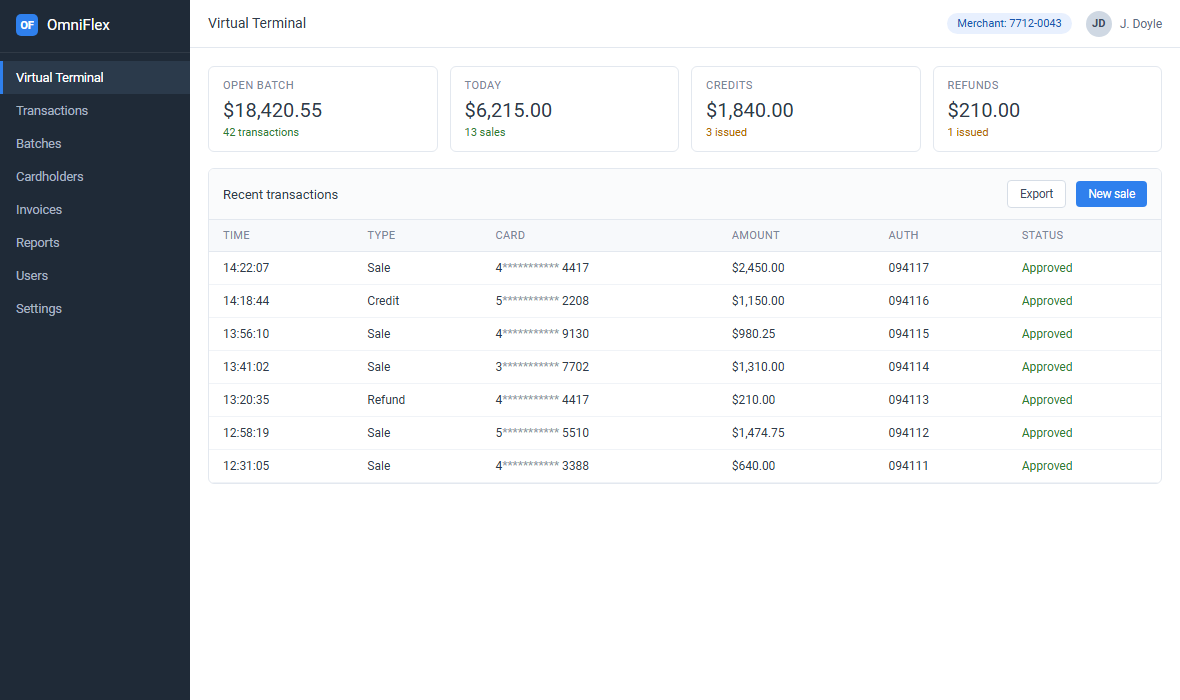
A merchant opens OmniFlex in a browser and keys a card number, expiration date and amount. The platform sends the authorization through the Worldpay environment and places the captured sale in an open batch. The terminal also holds cardholder records, invoices and reporting screens, depending on the permissions attached to the user.
OmniFlex is normally attached to a MID opened by Worldpay or an ISO. Without an approved merchant account there is no terminal login. That distinction matters during onboarding: the terminal credentials arrive after the application, risk review and merchant ID setup are complete.
OmniFlex merchant login
The merchant login asks for the email address registered on the account and the password. The email is usually the address entered during onboarding, not a personal mailbox invented by the user. If the account has several merchant records, the terminal may ask which MID to use after sign-in.
When the browser or network is unrecognized, OmniFlex presents a verification step. The portal masks the registered email and sends a six-digit code. Enter the code in the verification field to finish the session. Some accounts also offer an SMS method; the available options are controlled by the merchant configuration.
Why “unrecognized device” appears
A new computer, a cleared browser profile, a new internet connection or a corporate VPN can look like a different device. That is expected. A sign-in challenge that appears while nobody is using the account deserves a password reset and a check of the account's users.
Use “remember me on this computer” only on a named, encrypted device with a screen lock. Avoid it on a shared reception computer. For broader access-control advice, see merchant portal login security.
What a merchant can do after login
- Sales. Key a card-not-present sale and capture it in the open batch.
- Transactions. Search previous sales, authorizations, refunds and credits.
- Batches. Review open totals, close a batch and inspect settlement history.
- Cardholders. Store a card record for repeat charges when the account allows it.
- Invoices. Create a payment link for a customer, depending on the configuration.
- Reports. Export transaction and batch data for reconciliation.
- Users and settings. Administrators can manage access and terminal preferences.
The exact menu depends on role. A reporting user may see none of the payment entry screens, while a supervisor can issue refunds or credits.
Transaction types in OmniFlex
| Type | What it does | Reference needed |
|---|---|---|
| Sale | Authorizes and captures a card payment | Card details and amount |
| Authorization | Reserves funds for later capture | Card details and amount |
| Void | Cancels an unsettled transaction | Original transaction |
| Refund | Returns all or part of an earlier sale | Original transaction ID |
| Credit | Pays money to a card without an earlier sale | Card details and amount |
A credit is the transaction type that often causes confusion. Read the detailed standalone credit versus refund guide before using it on a live account.
Standalone credits in OmniFlex
A refund points to an earlier sale. A standalone credit does not. It sends money to a card number the operator keys manually, so the processor treats it as a higher-risk payout. The capability must be enabled on the merchant account, and some accounts have a per-credit or daily cap.
The usual steps are: sign in, open the transaction screen, select Credit, key the card and amount, add a reference, submit and then close the batch. The credit stays open until settlement. If the Credit option is missing, the terminal configuration or MID approval is incomplete.
OmniFlex fees and pricing
| Line item | Typical range | Who controls it |
|---|---|---|
| Virtual terminal or gateway | $10-$25 per month | ISO or reseller |
| Keyed card rate | 2.9%-3.5% + $0.10-$0.30 | Processor and merchant agreement |
| Batch fee | $0.05-$0.25 | Processor |
| Chargeback | $15-$30 each | Processor |
| ACH return | $2-$10 | Only if ACH is enabled |
| Statement fee | $0-$10 per month | ISO |
OmniFlex is one part of the total cost. The keyed rate is set on the merchant account, so two businesses using the same terminal can pay very different amounts. Compare quotes by total monthly cost divided by total monthly volume. The OmniFlex fees guide includes a worked effective-rate example.
Batches and settlement
An approved sale remains in the open batch until capture and batch close. Closing the batch submits captured transactions for settlement. The processor then credits the merchant bank account after the applicable clearing period and deducts fees or reserve amounts.
Most accounts see funds on the next banking day for a batch closed before the cutoff. A batch closed after the cutoff, on a weekend or on a holiday normally funds on the following business day. The merchant agreement and the acquirer's schedule control the final timing.
Reconcile three numbers after the first live batch: the terminal batch total, the processor settlement record and the bank deposit. A difference can come from a fee, a reserve, a refund or a transaction that failed to settle.
OmniFlex setup checklist
- Get the merchant account approved. Provide the legal business details, EIN, ownership information, bank account and a clear description of card-not-present volume.
- Receive the credentials. The provider issues a MID and creates the terminal user, usually through a welcome email.
- Configure security. Enable MFA, set user roles, choose the batch close time and decide whether cards may be stored.
- Set risk controls. Confirm AVS and CVV requirements, receipt templates and the billing descriptor.
- Run a test. Process a small sale, find it in the open batch, then void it and confirm the status.
- Close the first live batch. Match the settlement record to the bank deposit before scaling volume.
The general process is the same for most processor-hosted terminals; see the full virtual terminal setup guide for the non-platform-specific checklist.
Common OmniFlex login problems
- Incorrect email or password. Confirm the address on the merchant record and reset through the provider's documented process.
- Code not received. Check spam, quarantine and the phone or mailbox on file, then contact support if delivery still fails.
- Session expires immediately. Check browser cookies, private-mode settings and whether the machine is blocking storage.
- Credit option missing. The MID or user role is not approved for standalone credits.
- Merchant selection appears. The login is attached to more than one MID; choose the correct record before keying a transaction.
Frequently asked questions
What is the OmniFlex virtual terminal?
OmniFlex is a browser-based virtual terminal on the Worldpay/FIS merchant platform. An approved merchant signs in to key card-not-present sales, manage transactions, store cardholder records, close batches and issue credits or refunds.
How do I log in to OmniFlex?
Open the merchant login page and enter the email address registered on the merchant account followed by the password. If MFA is enabled, the portal sends a six-digit code to the registered email or phone.
Why does OmniFlex say I am signing in from an unrecognized device?
The platform treats a new browser, device or network as a new sign-in. Confirm it is you, request the verification code, enter it and use the remember-this-device option only on a trusted computer.
What if the verification code never arrives?
Check the mailbox registered to the merchant account, including spam and quarantine, then confirm the email or phone on file with the provider. Avoid requesting many codes in a row because the portal may rate-limit delivery.
Does OmniFlex support a credit without an original sale?
Yes, when standalone or unlinked credits are enabled on the merchant account. In the terminal, choose Credit rather than Refund. If the option is missing, the MID is not approved for that transaction type.
What is the difference between a credit and a refund?
A refund references a previous sale and is limited by that transaction. A credit pays money to a card without referencing an original sale, which is why processors often require separate approval and may cap the amount.
How much does OmniFlex cost?
The terminal is a gateway product, so cost is the monthly terminal or gateway fee plus the processing rate and per-item fees. A common small-merchant range is $10-$25 per month and a keyed rate of roughly 2.9%-3.5%, but the merchant agreement controls the actual price.
When does an OmniFlex batch settle?
Most batches closed before the processor cutoff fund on the next banking day. Batches closed after the cutoff, over a weekend or on a bank holiday usually fund on the following business day.
Can OmniFlex process ACH?
Card processing is the core function. ACH availability depends on the merchant account configuration and the ISO or processor that opened the account.
Why did my OmniFlex session expire?
The portal logs out inactive sessions. Sign in again. If the browser is not remembered, the platform may send another verification code.
More short answers are in the OmniFlex FAQ.